
Introduction
Have you ever wondered how apps like Zoom, Google Meet, or WhatsApp let you jump into a video call directly from your web browser without downloading bulky software? The magic behind that instant connection is WebRTC. Short for Web Real-Time Communication, WebRTC is an open-source framework that has completely changed how we exchange video, audio, and raw data across the internet. By enabling seamless peer-to-peer data sharing between devices, it eliminates long load times and clunky third-party plugins.
Whether you are a developer looking to build interactive video features or a curious tech enthusiast, understanding how this technology functions is key to grasping modern web connectivity. In this guide, we will break down what WebRTC is, how it enables high-quality real-time video communication, its underlying architecture, security features, and practical use cases.
What is WebRTC?
WebRTC is a free, open-source technology project supported by major browser vendors including Google, Apple, Microsoft, and Mozilla. Its primary goal is simple: allow web applications and mobile devices to exchange voice, video, and data in real time with virtually zero latency.
Before WebRTC arrived on the scene in 2011, setting up a video call on the web required users to download third-party software like Flash, Java applets, or custom browser extensions. These plugins were often slow, prone to security vulnerabilities, and frustrating to update. WebRTC fixed this by embedding native communication capabilities directly into modern web browsers via standardized Application Programming Interfaces (APIs).
Because it relies on open standards, developers can write a few lines of JavaScript to create video chat applications that work instantly across desktops, tablets, and smartphones.
Why WebRTC Matters for Real-Time Video Communication
Traditional media streaming—like watching a video on YouTube or Netflix—uses buffering. Your device downloads a few seconds or minutes of content in advance to prevent playback interruptions.
However, buffering creates lag. While a 5-second delay does not matter when you are watching a movie, it completely ruins a live conversation. If you speak and the other person hears you five seconds later, you end up talking over each other.
WebRTC is built specifically for real-time video communication. It reduces delay (latency) to under 500 milliseconds—often around 100 to 200 milliseconds—making online conversations feel as natural as talking to someone in the same room.
Here are a few key advantages it brings to the table:
- No Download Required: Users can join calls directly from Google Chrome, Safari, Firefox, Edge, or mobile apps without installing additional tools.
- Low Latency: Data travels directly between users whenever possible, eliminating the delay introduced by traditional central servers.
- Cross-Platform Compatibility: It works consistently across operating systems (Windows, macOS, Linux, iOS, Android).
- High Quality: Advanced audio and video codecs automatically adapt to your internet connection speed to maintain sharp video and clear sound.
- Built-in Security: All communications are encrypted end-to-end by default.
The Three Core APIs of WebRTC
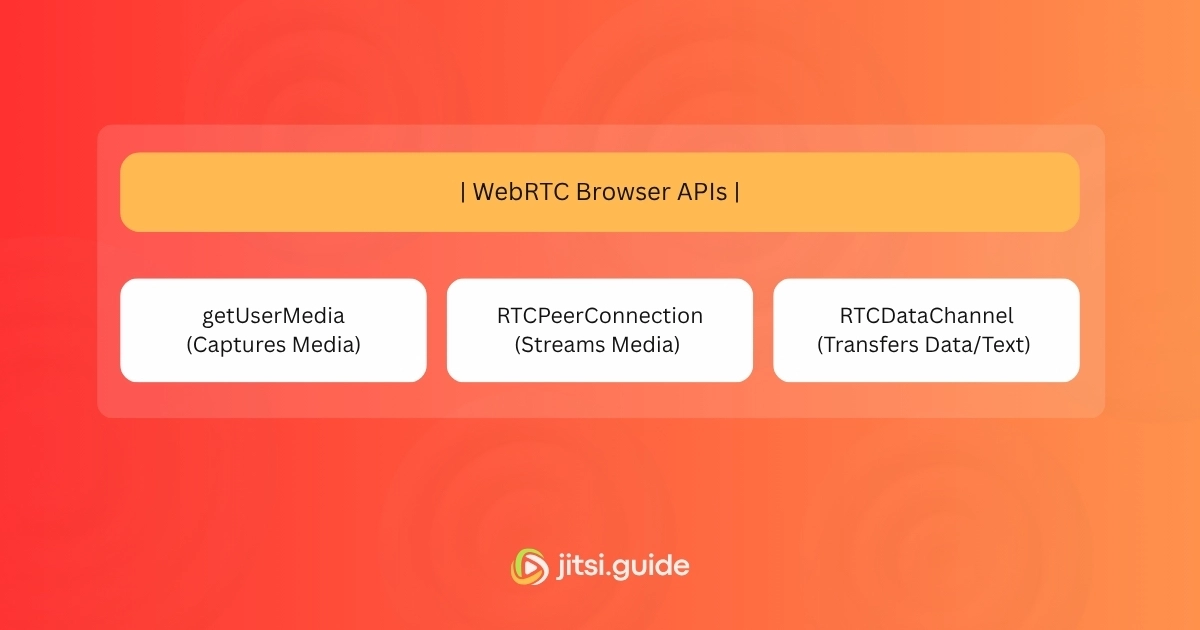
To understand how WebRTC works under the hood, you don’t need a degree in network engineering. It relies on three primary JavaScript APIs that manage camera access, connection setup, and data transfer.
1. MediaStream (getUserMedia)
Before you can send audio or video across the web, your browser needs permission to access your microphone and camera. The getUserMedia API requests this access from the user and captures the raw media streams. It handles settings like resolution, frame rate, and microphone volume so the developer does not have to write separate hardware drivers for every device.
2. RTCPeerConnection
This is the heart of WebRTC. The RTCPeerConnection API handles the actual audio and video transmission between two devices. It takes care of complex networking tasks, including:
- Managing network bandwidth dynamically.
- Encoding and decoding video and audio streams.
- Restoring lost data packets over unstable connections.
- Ensuring media flows directly between users via a peer-to-peer (P2P) connection.
3. RTCDataChannel
WebRTC isn’t just for video and voice; it can also send non-media data. The RTCDataChannel API allows devices to exchange text, images, files, or game state updates directly with each other. Because it bypasses middleman servers, file transfers through WebRTC are fast and private.
How WebRTC Works: Step-by-Step Breakdown
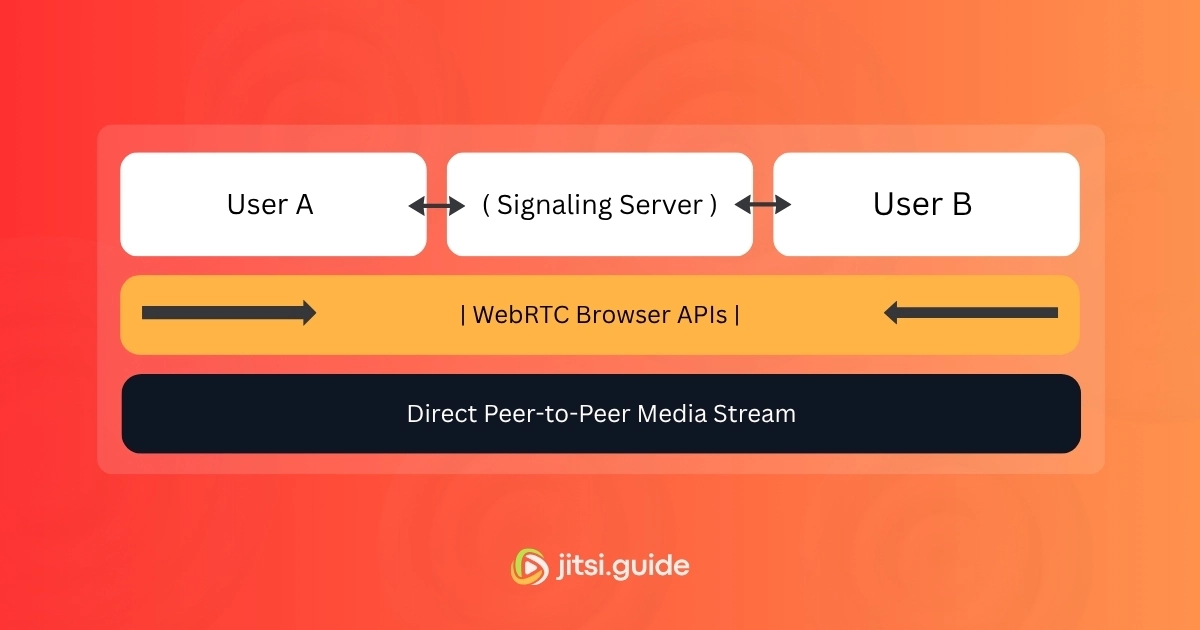
Establishing a direct video connection between two web browsers located in different parts of the world is surprisingly complex. Devices are often hidden behind firewalls, Wi-Fi routers, and private IP addresses. Here is a step-by-step walk-through of how WebRTC establishes a real-time connection.
Step 1: Media Capture
User A opens a web app and grants permission to access their camera and microphone via getUserMedia. The browser generates a media stream containing video and audio tracks.
Step 2: Signaling (Finding Each Other)
WebRTC allows devices to talk directly, but they first need to find each other. This discovery process is called Signaling.
During signaling, the two devices exchange essential setup information:
- Network information (IP addresses and ports).
- Session control messages (initiating, closing, or pausing a call).
- Media configuration (what resolution and audio codecs both browsers support).
WebRTC does not prescribe a specific signaling protocol. Developers can use WebSockets, HTTP requests, or any messaging system to pass these initial setup messages between browsers via a lightweight central signaling server.
Step 3: SDP Offer and Answer
To negotiate call details, browsers use a text format called Session Description Protocol (SDP).
- User A creates an SDP Offer detailing their video capabilities and network setup, then sends it through the signaling server to User B.
- User B receives the offer, creates an SDP Answer accepting the call parameters, and sends it back to User A.
Step 4: NAT Traversal (STUN & TURN Servers)
Most home and business devices sit behind routers using Network Address Translation (NAT) and strict firewalls. This means your computer usually does not have a public IP address that another computer on the internet can see directly.
To overcome this, WebRTC uses a framework called ICE (Interactive Connectivity Establishment) alongside two types of helper servers:
- STUN Servers (Session Traversal Utilities for NAT): The browser contacts a public STUN server to ask, “What is my public IP address and port?” The STUN server replies with this info, allowing the browser to share its public location with the other peer. STUN servers handle roughly 80% to 90% of direct WebRTC connections.
- TURN Servers (Traversal Using Relays around NAT): If a user is behind a strict corporate firewall or dynamic symmetric NAT, direct peer-to-peer connection fails. In this scenario, the connection falls back to a TURN server. The TURN server acts as an encrypted middleman relaying video traffic between the two users. While it is no longer strictly P2P, it ensures the call connects 100% of the time.
Step 5: Direct Media Streaming
Once network paths are validated and codecs are agreed upon, the signaling phase ends. The browsers lock in an encrypted peer-to-peer connection. Video and audio frames flow directly from User A to User B with minimal lag.
Key Components & Architecture Behind WebRTC
Behind the simple JavaScript APIs, WebRTC relies on several underlying networking technologies and codecs to deliver smooth playback.
| Component Type | Technologies Used | Purpose |
|---|---|---|
| Audio Codecs | Opus, G.711 | Compresses audio. Opus adapts automatically from speech to high-fidelity music. |
| Video Codecs | VP8, VP9, H.264, AV1 | Compresses video frames to fit available network bandwidth without dropping frames. |
| Transport Protocols | UDP, SRTP, DTLS | Uses UDP for low-latency delivery instead of slower, error-checking TCP. |
| Network Helpers | ICE, STUN, TURN | Discovers network routes and bypasses firewalls to connect devices globally. |
Is WebRTC Secure?
Security is a primary design requirement for WebRTC, not an afterthought. Because it runs directly inside modern web browsers, security standards are enforced automatically without requiring user configuration.
Here are the key security mechanisms built into the platform:
- Mandatory Encryption: Encryption is not optional in WebRTC. All media and data sent via WebRTC are encrypted using SRTP (Secure Real-time Transport Protocol) and DTLS (Datagram Transport Layer Security). Even if someone intercepts your network traffic, they cannot view the video feed or hear the audio.
- Explicit Permissions: A web page cannot silently access your webcam or microphone. The browser forces an explicit pop-up asking for user permission every time a site attempts to record audio or video.
- No Plugins: Older communications tech required third-party plugins like Flash or ActiveX, which were frequent targets for malware and security exploits. WebRTC runs natively inside the browser sandbox, isolating media streams from the rest of your system.
Common Use Cases for WebRTC Today
While video conferencing is the most popular use case, WebRTC powers a wide range of interactive digital experiences across industries.
- Video Conferencing Platforms: Google Meet, Discord, and Slack rely heavily on WebRTC to host multi-party voice and video chats in web browsers.
- Telehealth & Remote Medicine: Doctors use secure WebRTC connections to conduct virtual check-ups with patients while ensuring health data remains private and encrypted.
- Customer Support: Modern help desks embed one-click video and audio calling directly inside websites so customers can talk to support agents without dialing a phone number.
- Online Education & Tutoring: Interactive virtual classrooms use WebRTC to stream live video, share whiteboards, and permit screen sharing simultaneously.
- Peer-to-Peer File Sharing: Web-based file drop tools use the
RTCDataChannelAPI to share large files directly between users’ computers without uploading them to cloud storage first. - Live Commerce & Auction Streaming: Retail brands host live interactive video shopping events where viewers can ask questions and purchase products with minimal video lag.
Conclusion
WebRTC has redefined what is possible on the web by bringing low-latency real-time video communication directly to browser tabs and mobile apps everywhere. By stripping away plugins, reducing lag, and providing end-to-end security out of the box, it provides developers with a reliable foundation to build the next generation of collaborative tools.
Whether you are building a custom telemedicine portal, an interactive virtual classroom, or a simple video chat app, WebRTC offers the performance, simplicity, and flexibility needed to bring human connection to any digital platform.
Ready to Build Ultra-Low Latency Video Apps
Don’t let lag ruin your user experience. Whether you’re building a video conferencing platform, telemedicine portal, or live stream app, our team can help you implement custom WebRTC solutions seamlessly.